An AI virtual assistant does the typing. You still do the deciding. It’s software you give a job in plain words, and it gets the first pass done: the inbox sorted, the reply drafted, the day laid out. What it can’t do is make the calls that cost you money or trust, or show up in person.
Here’s the plain answer for a small-business owner: what an AI virtual assistant is, what it really does, how it differs from a chatbot and from a person, what it can’t do, what to check before you pick one, and how Operly does it, with real screens.
What is an AI virtual assistant?
It’s software that does assistant work for you. You tell it what you need. It looks at what it’s connected to, such as your email, calendar, tasks and files, does the work it can, and hands the result back for you to check.
Search for the phrase and you’ll find two different things under one name. One is software that talks to your customers: answering questions, taking bookings. The other is software that works for you: your inbox, your calendar, your follow-up. This post is about the second kind.
In Operly we call it an AI team member, and you get a chief of staff you talk to plus team members you give a job.
What does an AI virtual assistant actually do?
It does the written, repeatable part of an assistant’s week. Most of it falls into six jobs:
- Inbox. Sort it, flag the people you can’t miss, archive the noise, draft replies.
- Calendar. Keep today and tomorrow in view, and put events on it.
- Meeting prep. A short note waiting before you walk in.
- Briefs. What’s due, what’s on, what to do first.
- Follow-up. Turn “can you send me the invoice?” into a task with a date.
- Files and notes. Answer from your own documents so you stop re-explaining.
That’s an assistant with a job, not a box you type questions into. The checking at the end is still yours, and it should take you seconds.
You don’t need all six. What can I delegate to AI first has seven starter jobs and a four-question test for anything else. For the inbox on its own, read what an AI email assistant should do.
How is an AI virtual assistant different from a chatbot?
A chatbot is a box. You type a question, it answers, and you go do the work.
An AI virtual assistant goes and does a piece of the work. It reads your mail, writes the draft, adds the task. It can also run without you sitting there: on a schedule, or when something happens, like a new email arriving.
Here’s a quick test. After you close the window, has anything been prepared for you? If not, you’ve been talking to a box.
How is it different from a human virtual assistant?
It’s a sorting job, not a contest.
A person is better at phone calls and anything live, errands, work that happens off the screen, and judgment built from knowing your clients for years. If a task needs a human voice, a human face or a human memory of your business, hire a person.
An AI virtual assistant is better at the first pass on repetitive written work, at any hour, done the same way each time. It won’t get bored or forget. It also won’t know you the way a person does, so you still read what it writes.
Plenty of owners end up using both. Our virtual assistant vs AI post has a 15-minute task sort that tells you which pile each job belongs in, and there’s a side-by-side on the virtual assistant comparison page.
What can’t an AI virtual assistant do?
It can’t decide for you, and it can’t be in the room.
Keep these for yourself:
- Prices and quotes. One wrong number is now in writing.
- Complaints and bad news. Tone matters more than speed.
- Money, legal and contract questions. These are yours.
- First contact with someone important. You only get one first impression.
- Anything that carries your voice and your relationship. A draft can start it. The words should be yours.
Some jobs belong to a person because they happen off the screen: phone calls to clients, errands, anything in person.
It also works from what it can see: your connected accounts, your tasks, your files and the notes you give it. If something lives only in your head, it doesn’t know it yet.
Are free AI virtual assistants enough?
Sometimes, for trying the idea. Some tools offer a free version, and it’s a fair way to find out whether you like handing off a job.
The question to ask isn’t the price. It’s what the free version limits. Can it connect to your email and calendar, or only answer questions? Can it act, or only talk? Is there a cap on how much you can use it? A free tool that can’t reach your real work leaves you doing the work yourself.
Operly is a paid product: Pro is $50 a month and Business is $200 a month. Pricing has the details.
What should I check before I pick one?
Run any tool, ours included, through these six questions.
Where does it work? Inside your email, calendar, tasks and files, or only in a chat box?
What happens to a draft? Does it wait for you, or can it send? Can you choose?
Does it keep working when you’re away? Can it run on a schedule or when an email arrives?
Can you see what it did? Look for a history you can read, not just a result.
What does the free or cheap tier limit? Usage, connected accounts, or what it’s allowed to do.
Is there a plain statement on how your data is handled? Read it before you connect your email. Don’t rely on a sales page or a blog post, including this one.
If a tool can’t answer one of these in plain words, treat that as your answer.
How does Operly do this?
Operly is an AI team: a chief of staff you talk to, plus team members you give a job, such as inbox and follow-ups. They work inside your real email, calendar, tasks and files. The screens below use a made-up studio, Northwind Studio.
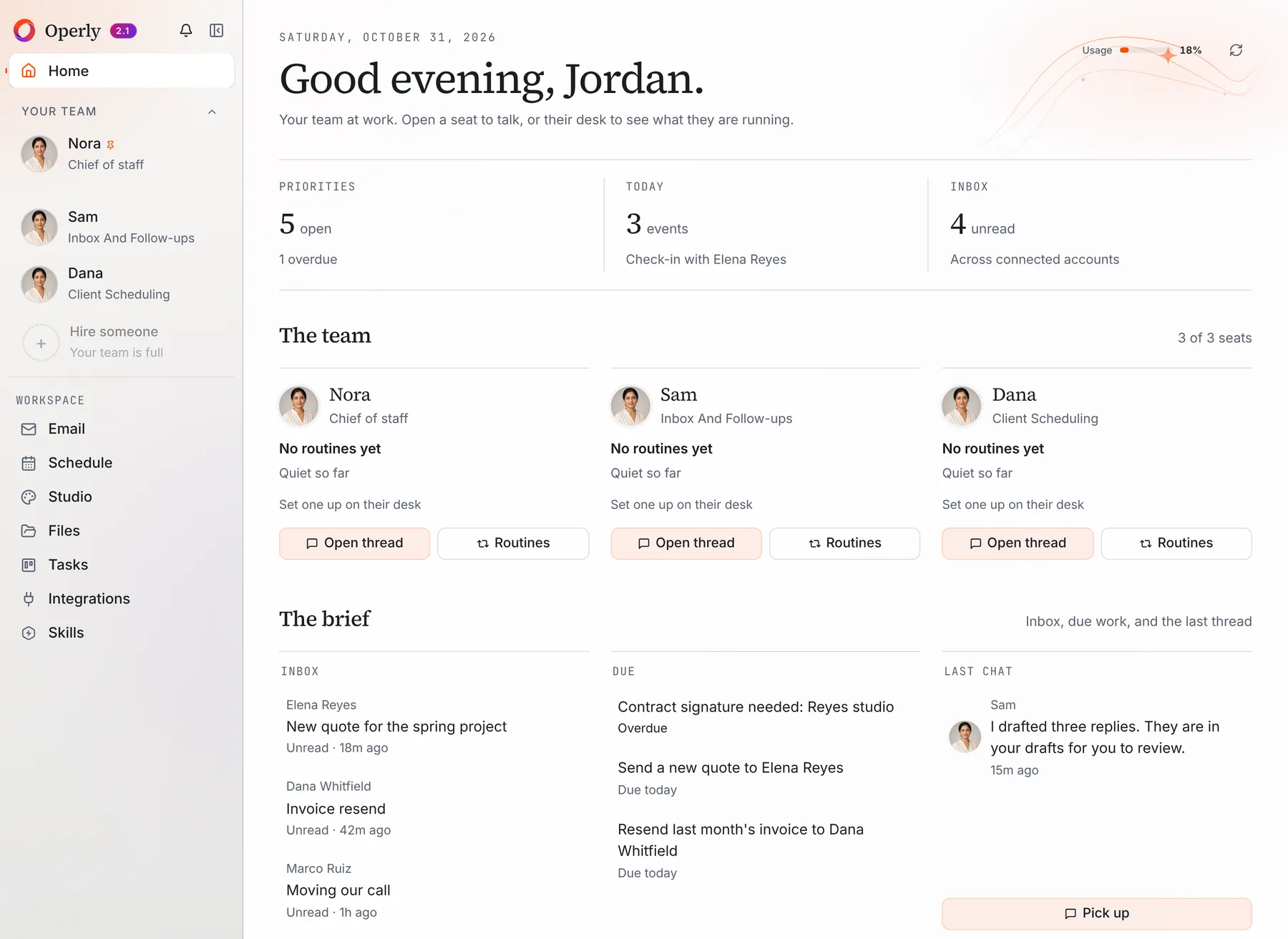
Your day at a glance. Home shows three tiles: Priorities, Today and Inbox, with counts for open tasks, events and unread mail. Under them, The brief lists your latest inbox items, the work that’s due, and your last chat with the team.
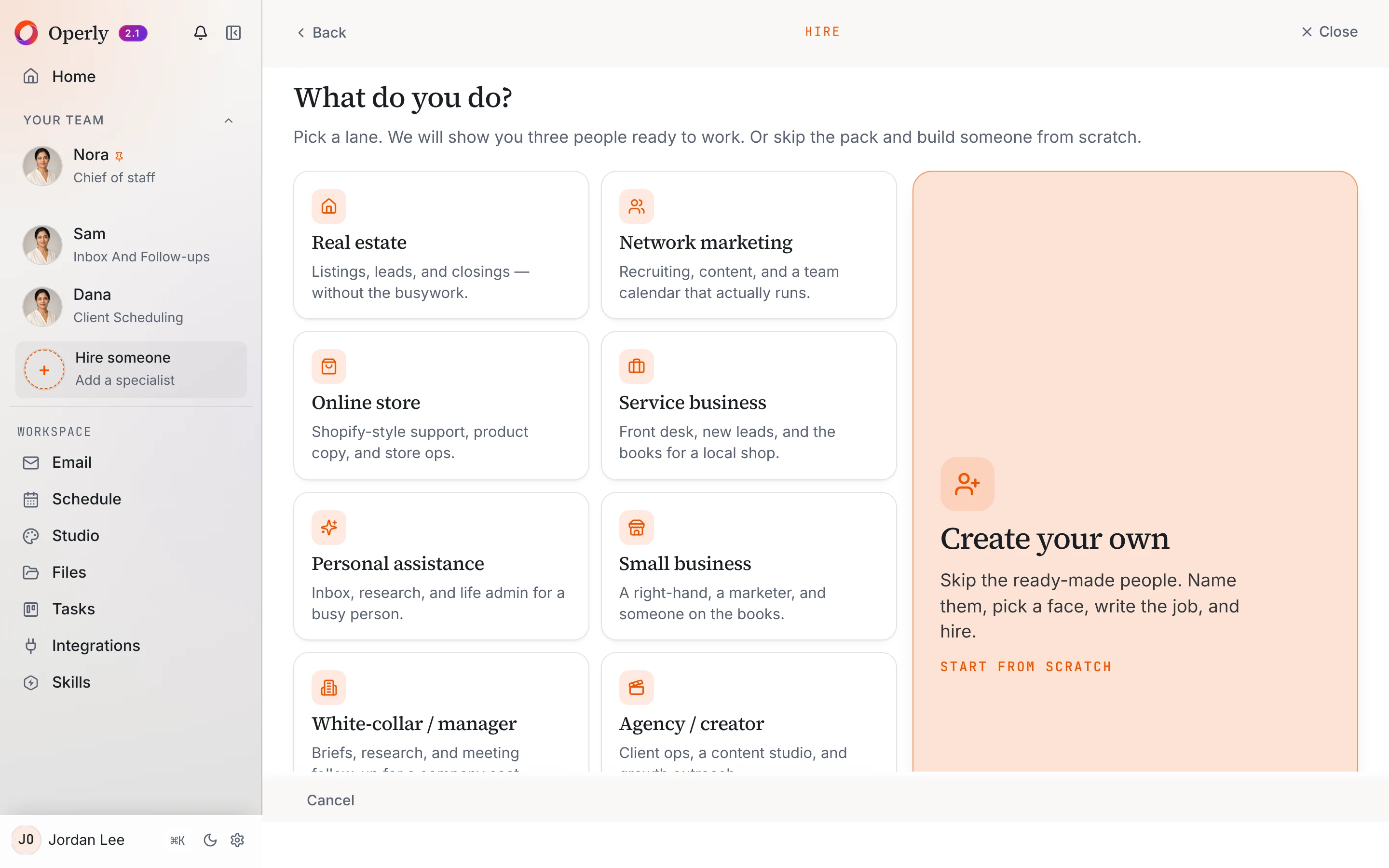
Hiring a team member. Choose Hire someone, then pick the kind of work you do.
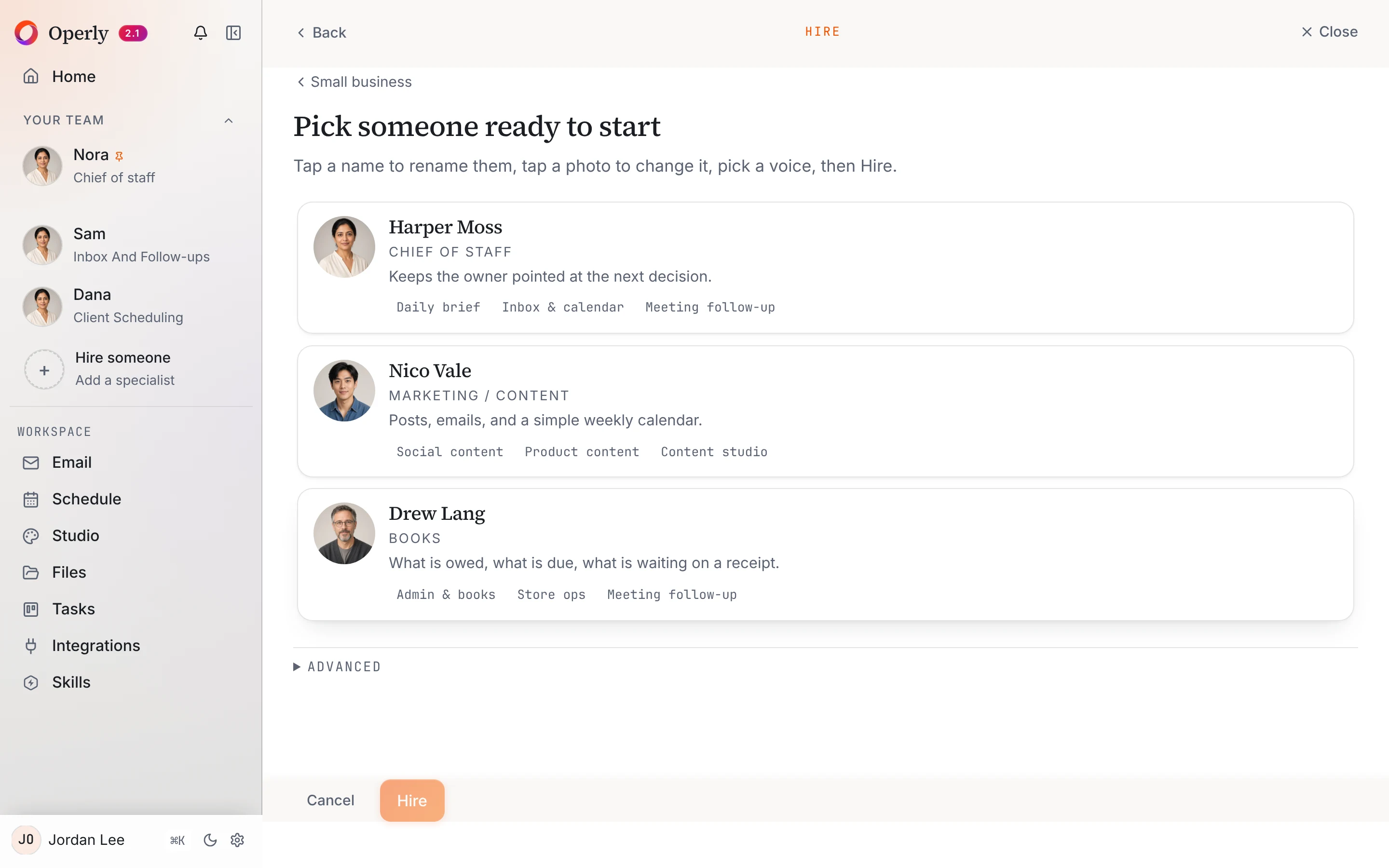
Operly then shows three people ready to start for that kind of work. Or choose Create your own and write the job yourself.
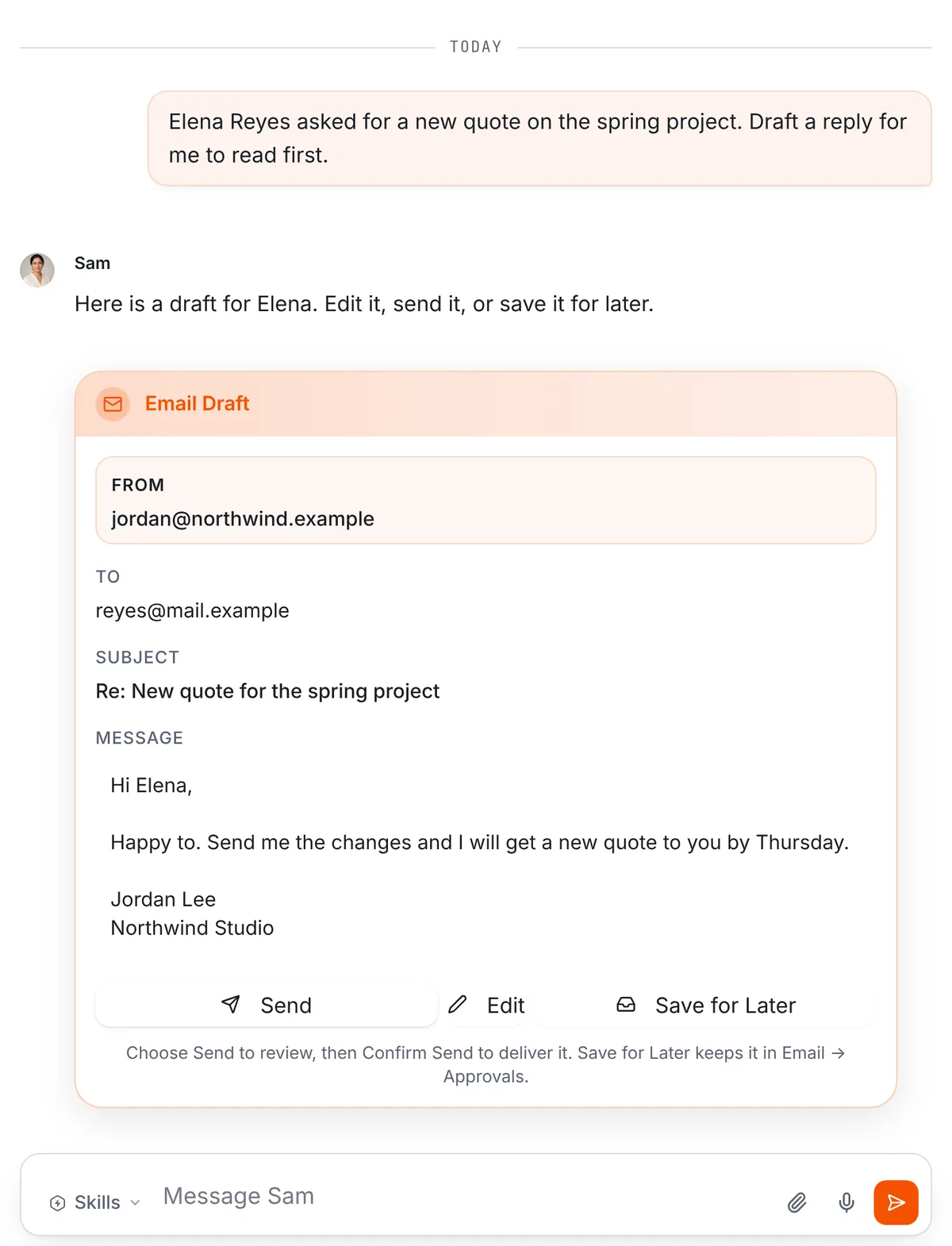
A job with a draft you read first. Tell a team member what you need, for example “Draft a reply to Elena about the new quote. I want to read it first.” You get an email draft in the thread, with the account, the recipient, the subject and the full text.
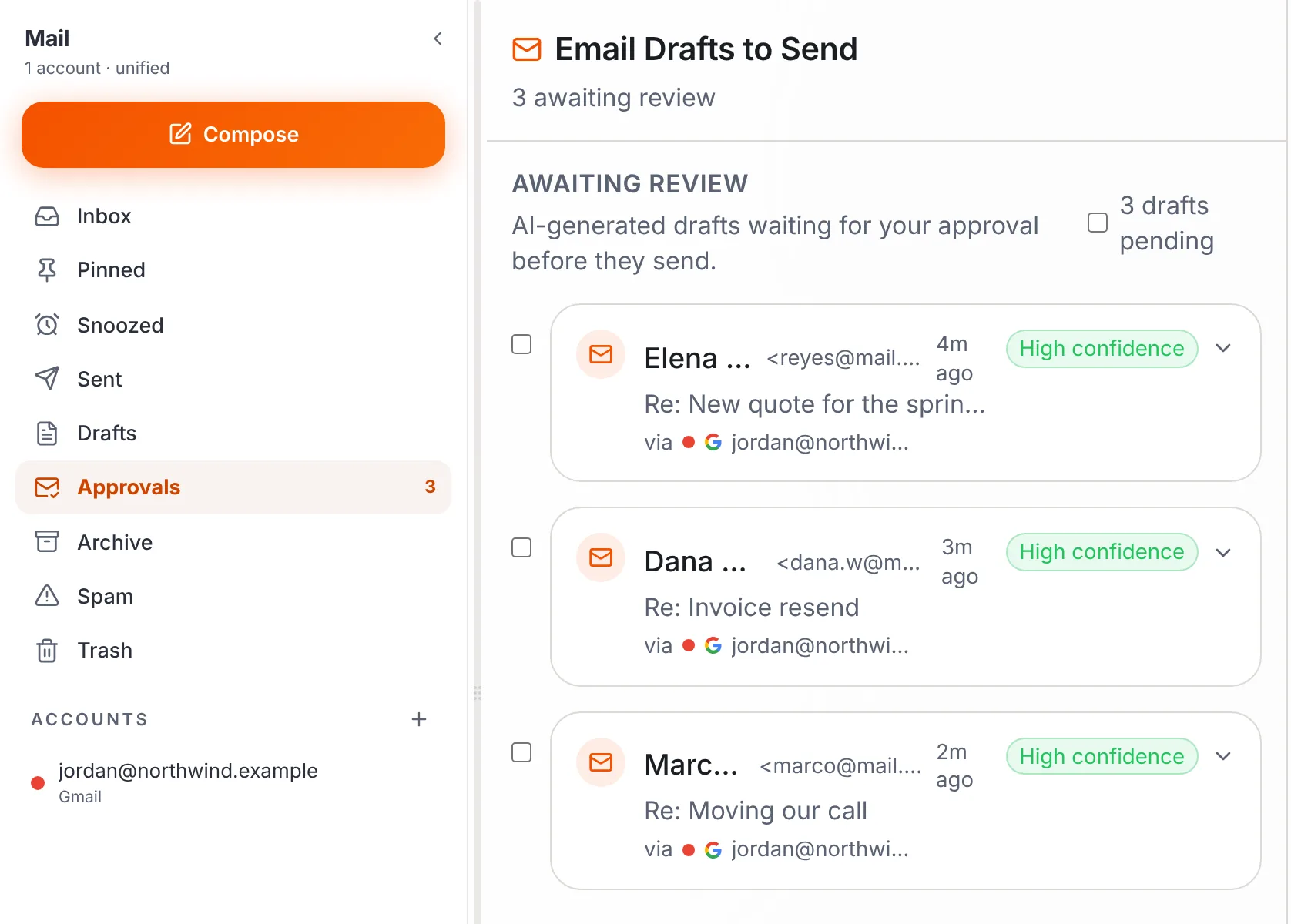
Drafts you save wait in Email, then Approvals.
Who sends? Your team carries out the sends you ask for, so ask for drafts when you want to read first. With your chief of staff, say “draft it” when you want to read first.
Files. In a team member’s thread, use the paperclip to attach a file, then ask your question about it.
Jobs that repeat. A routine is a job written as a sentence with a trigger. A trigger can be a schedule, such as every morning, or a new email arriving. Open a team member’s desk and select Routines to set one up. Read more on the routines page.
Plans. Pro is $50 a month, or $500 a year with two months free, for 3 seats. Business is $200 a month, or $2,000 a year, for up to 20 seats and adds premium voice calls with your team and five times the premium usage. Both plans include the workspace computer your team uses for browser work.
For what Operly stores and how your data is handled, read the Security page rather than a summary here.
Meet your chief of staff, hand over one job from the list, and read what comes back before it goes anywhere.
What should I try first?
Pick one job, not six.
- Day 1. Connect your email and calendar, or start at Get started. Choose one job from the list above.
- Day 2. Ask for it in one clear sentence. Ask for a draft, not a send.
- Days 3 to 5. Read what comes back. Fix the sentence, not the output.
- Friday. Ask three questions. What finished without me? What needed my judgment? What do I want to hand over next?
If you run the whole business yourself, what an AI executive assistant can do goes job by job for an owner. For an easy first win, set up a morning briefing with AI.

We build Operly, an AI team for business owners. Your chief of staff hands the work to team members who follow up, draft and organize, and you keep the decisions. About Operly · Watch the demo