
Hand off the follow-up. Keep the advice. AI for real estate agents works best on the writing that piles up while you’re out showing homes: the thank-yous, the first drafts, the check-ins. It doesn’t belong anywhere near your pricing advice, your negotiating or your promises.
Here’s a plain, job-by-job guide for a working agent: what to hand off, what to keep, how to choose a tool, and how it looks in Operly with real screens.
What can AI do for a real estate agent?
It can do the first pass of your written work. You say what you need in plain words. It writes the note, the post or the list, and hands it back for you to read.
That covers a lot of an agent’s week, but not all of it. It can’t walk a buyer through a house, read a seller’s mood or tell a client the truth about their price. It does the typing around those moments so you have more time for them.
In Operly, we call it an AI team: a chief of staff you talk to, plus team members you give a job, such as following up with leads. If you’re new to the idea, what is an AI virtual assistant explains it for any small business.
Which real estate jobs can you hand off, and which do you keep?
Seven jobs cover most agents. For each one, here’s what to hand off and what to keep.
1. Lead follow-up.
- Hand off: the first reply to a new inquiry, the second note with something useful in it, the gentle nudge.
- Keep: the conversation once a lead asks about price, an offer or a showing time.
- The day 1, 3 and 7 rhythm and seven copy-ready emails are in how to follow up with real estate leads using AI. This post doesn’t repeat them.
2. Open house and showing follow-up.
- Hand off: a personal note for everyone on the sign-in sheet, using what you remember about each visitor (“loved the kitchen”, “asked about the school zone”).
- Keep: who gets a call instead of an email, and any visitor who says they’re ready to move.
- The more you tell it about each person, the less the note sounds like a template. Notes from your own head beat notes from nowhere.
3. Listing prep and descriptions.
- Hand off: a first draft of the description, a post, an email and a slideshow, from the facts you give it.
- Keep: the facts. Check square footage, taxes, fees, schools and every claim about the home. If you didn’t give it a detail, and you can’t confirm it, cut it.
- Also keep the choice of photos, the tone and anything that describes the neighborhood or the people in it.
4. Client email and calendar.
- Hand off: sorting buyer and seller mail to the top, drafts of routine replies, turning “can you send me the disclosure?” into a task with a date, laying out tomorrow’s showings.
- Keep: replies about money, deadlines or anything in a contract, and the final say on what goes on your calendar.
- A morning briefing and meeting prep for a listing appointment are two easy places to start.
5. Past-client touches.
- Hand off: a quarterly check-in draft for each past client, written on a schedule so it doesn’t depend on your memory.
- Keep: the real detail only you know. Add one line about their new kitchen or their kid’s school before you send.
6. Content.
- Hand off: a week of post ideas, captions, a market-update outline, a short slideshow for a new listing.
- Keep: the opinions and the claims. If a post says what the market is doing, you check it first.
7. Getting started. Pick one job from the list, not seven. There’s a one-week plan at the end of this post.
What should you never hand to AI?
Four things stay with you, whatever the tool.
- Pricing advice. What a home is worth, and what to list it at, is your judgment and your name.
- Negotiation. Offers, counters and what to say next are yours.
- Anything about a client’s situation. A job loss, a divorce, a health problem, a deadline they’re sweating. Don’t paste it in to get a nicer draft, and write those notes yourself.
- Promises. “I’ll have it to you by Friday.” “The seller will fix that.” If it commits you to something, you write it.
A draft can start any of these. The sentence that goes out should be one you chose.
What about marketing rules and fair housing?
Rules for marketing messages and fair housing vary by place and brokerage. Read what applies to you, and keep your own review of anything that goes to a client, whether you or a tool wrote it. This is general information, not legal advice, and no tool, ours included, takes that responsibility off you.
How do you choose an AI tool as a real estate agent?
Run any tool through these six questions. No product names, no ratings.
Does it do a job you have? Name the job first: open house follow-up, listing drafts, client email. If you can’t, you’re shopping for a gadget.
Where does it work? Inside your email, calendar, tasks and files, or only in a box you copy and paste from?
What happens to a draft? Does it wait for you, or can it send? Can you choose?
Can you see what it did? Look for a history you can read, not just a result.
What does the cheap or free tier limit? Usage, connected accounts, or what it’s allowed to do.
Is there a plain statement on how client information is handled? Read it before you connect your email. Don’t rely on a sales page or a blog post, including this one.
If a tool can’t answer one of these in plain words, treat that as your answer.
How does this work in Operly?
The screens below use made-up names and a made-up workspace.
Pick the kind of work you do. Choose Hire someone, then pick your lane.
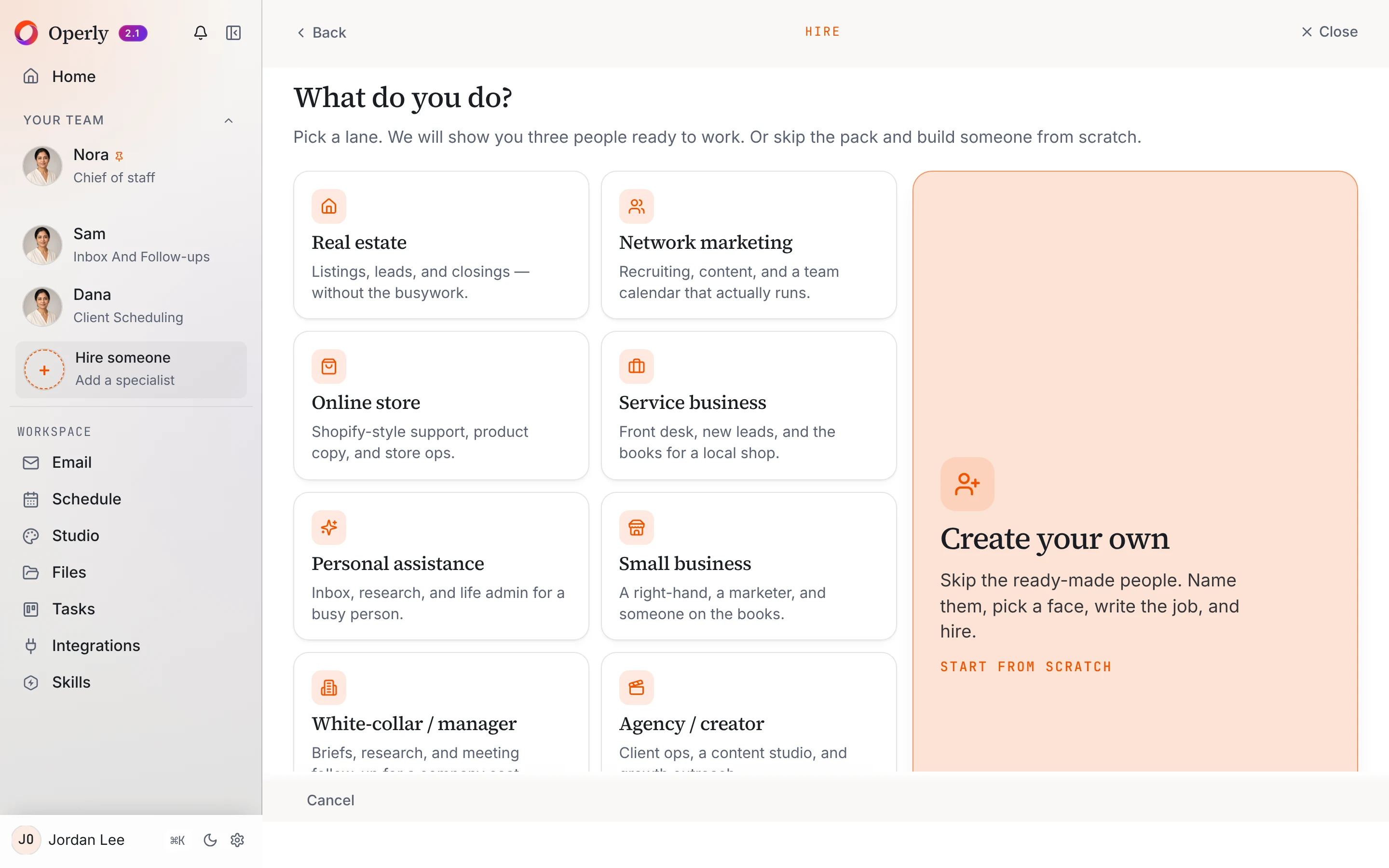
Meet the real estate starter team. The Real estate lane shows three people ready to start: a listing coordinator, an ISA or lead follow-up person, and a transaction coordinator. Each has a one-line job and a few skills. You can rename them, change the photo and then hire.
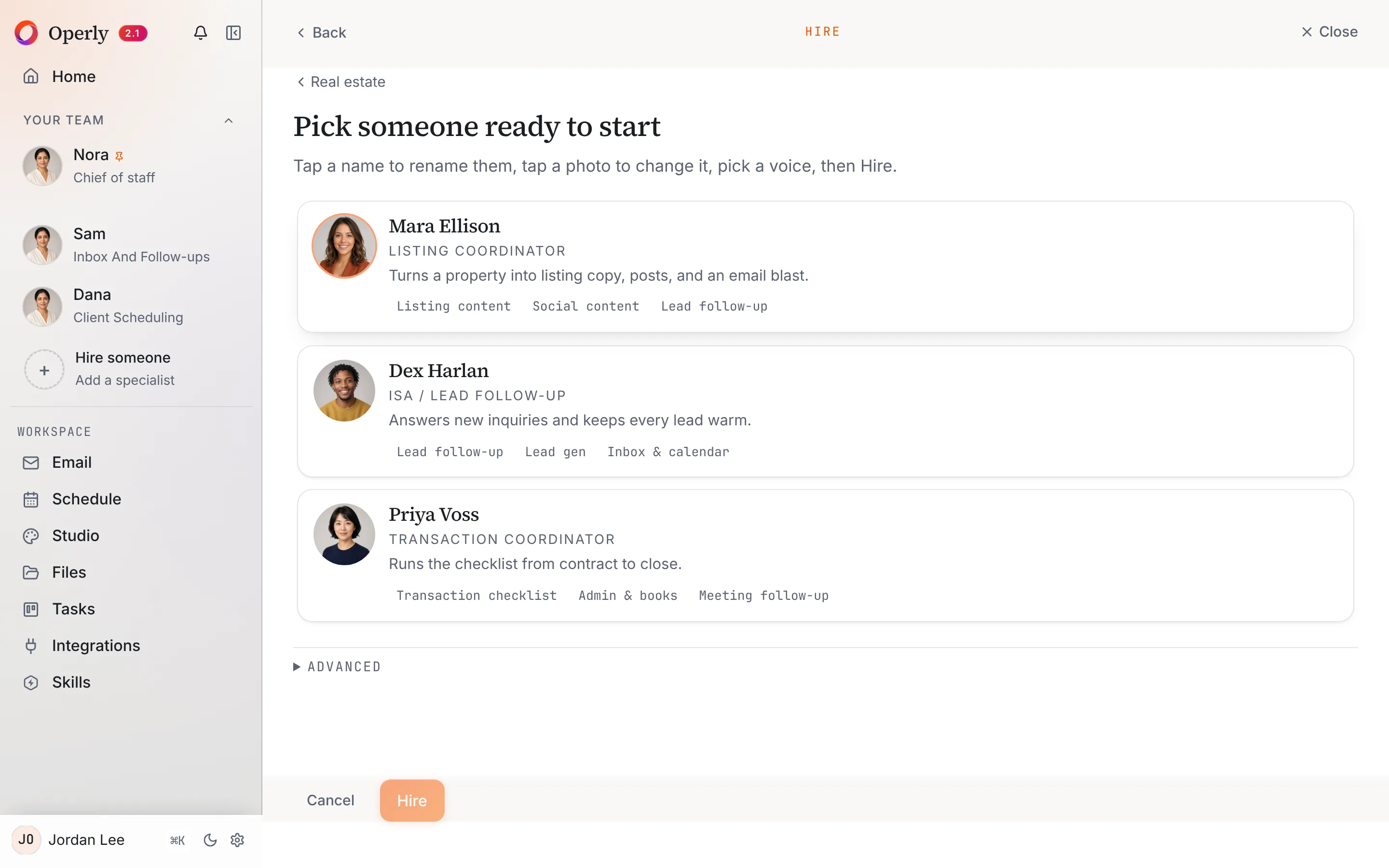
Their cards read: “Turns a property into listing copy, posts, and an email blast.” “Answers new inquiries and keeps every lead warm.” “Runs the checklist from contract to close.” Whatever the card says, ask for drafts when you want to read first. You can also skip the starter team and write your own job.
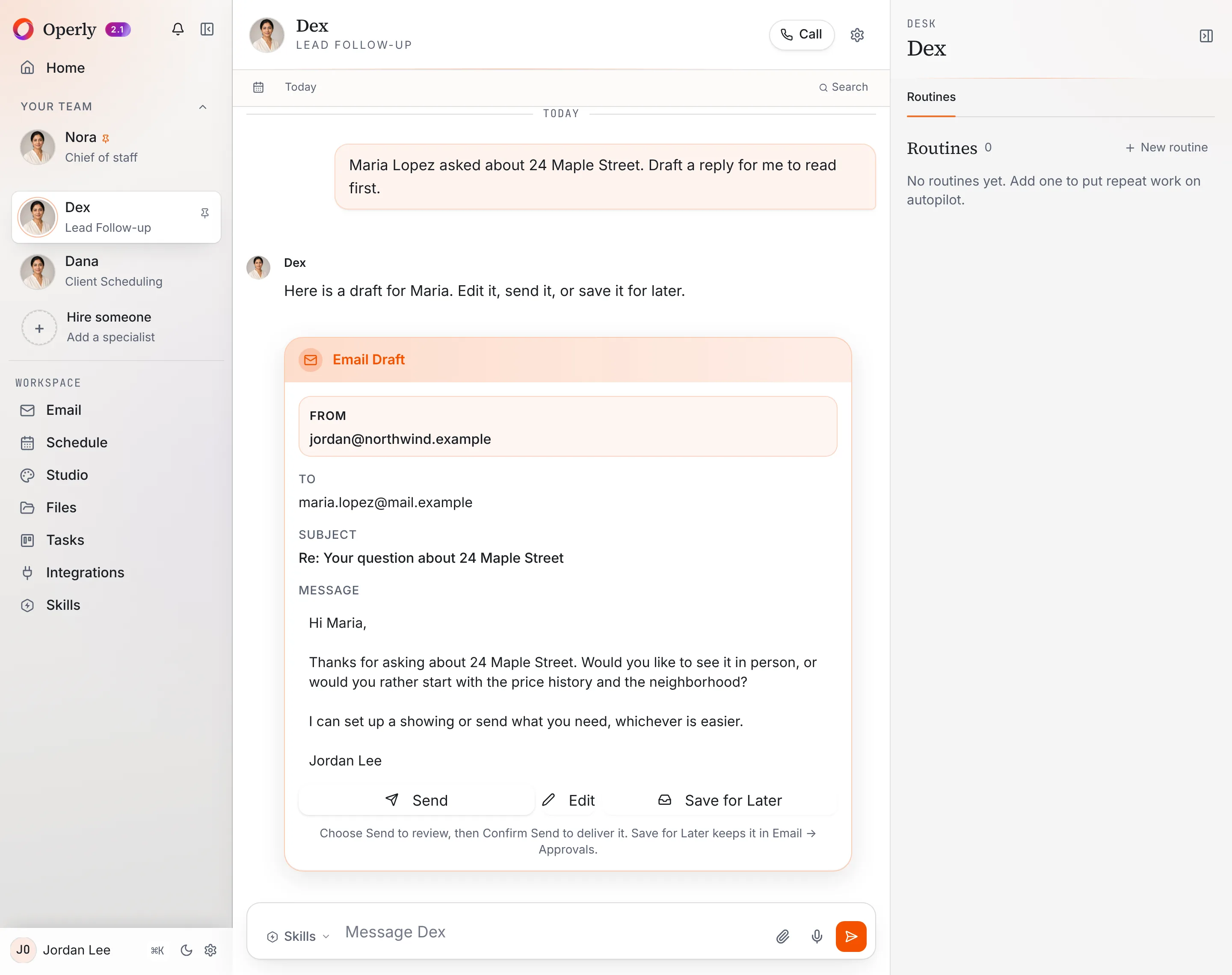
A job with a draft you read first. Tell a team member what you need, for example: “Maria Lopez asked about 24 Maple Street. Draft a reply for me to read first.” You get an email draft in the thread, with the account, the recipient, the subject and the full text.
Drafts you save wait in Email, then Approvals.
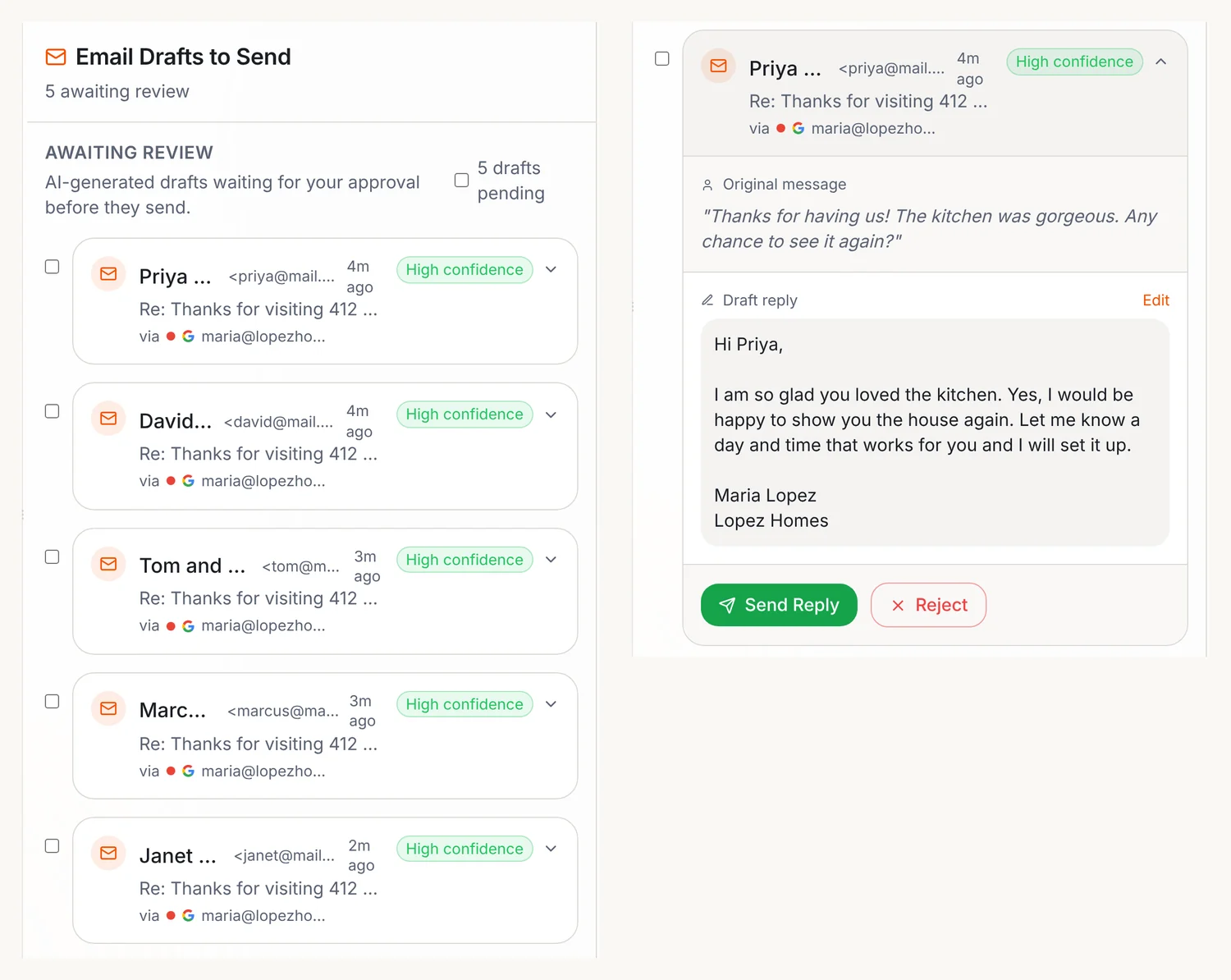
Who sends? Your team carries out the sends you ask for, so ask for drafts when you want to read first. With your chief of staff, say “draft it” when you want to read first.
Files. In a team member’s thread, use the paperclip to attach a file, such as a sign-in sheet, a PDF or a photo, then ask your question about it. You can also just type the names and what you remember about each person.
Jobs that repeat. A routine is a job written as a sentence with a trigger. A trigger can be a schedule, such as every week, or a new email arriving. Open a team member’s desk and select Routines to set one up. Open a routine’s Run history to see what each run did. Read more on the routines page.
Content. Studio makes social posts, images, slideshows and more from what you give it, and keeps them in your library. Check every fact in a listing post before you use it.
Plans. Pro is $50 a month, or $500 a year with two months free, for 3 seats. Business is $200 a month, or $2,000 a year, for up to 20 seats and adds premium voice calls with your team and five times the premium usage. Both plans include the workspace computer your team uses for browser work. There is no free tier. Pricing has the details.
For what Operly stores and how your data is handled, read the Security page rather than a summary here. For the full real estate picture, see Operly for real estate agents or watch the demo.
Meet your chief of staff, hand over one real estate job, and read what comes back before it goes anywhere.
How do you start?
Pick one job, not seven.
- Day 1. Choose the job that eats your evenings. For most agents that’s follow-up. Set up your email and calendar with Get started.
- Day 2. Ask for it in one clear sentence, with what you know about each person. Ask for a draft, not a send.
- Days 3 to 5. Read what comes back. Fix the sentence you asked with, not just the output.
- Friday. Ask three questions. What finished without me? What needed my judgment? What do I hand over next?
If you want a longer list of first jobs and a test for anything else, read what can I delegate to AI first. If you run the whole business yourself, what an AI executive assistant can do goes job by job for an owner.

We build Operly, an AI team for business owners. Your chief of staff hands the work to team members who follow up, draft and organize, and you keep the decisions. About Operly · Watch the demo