The best meeting prep is a note that’s already written when the invite lands. Not one you build at 1:55 for a 2:00 call.
You know the scramble. The calendar says a meeting starts in five minutes, and you’re opening three tabs to remember who’s coming and why. This post covers what a good prep note holds, the ways to get one automatically, and wording you can copy so one is waiting for you.
What should a meeting prep note include?
Short and specific beats long and thorough.
- Who and when. The attendees and the time, so you’re not hunting through the invite.
- What it’s for. One line on the point of the meeting.
- What you want out of it. Two or three outcomes.
- Open questions. What you need to ask or confirm.
- What you owe them. Anything you promised last time.
That’s a half-page. If it takes more than a minute to read, nobody will.
What are the ways to prep automatically?
Wispr’s guide splits it into three, from manual to automatic, and the pattern is useful: paste the invite and notes into an assistant, ask across your history, or let the prep arrive on its own. Here’s how the tools that do the third one work, as their own pages describe them.
- Meeting-notetaker briefs. Fireflies sends a Meeting Prep brief built from your past meetings with the same attendees, about three hours before the meeting. It needs a connected calendar and uses AI credits.
- CRM add-ons. Capsule’s AI Meeting Prep works from the calendar event and your CRM history, and you press a Prepare button beside the event. It’s available on certain Capsule plans.
- Build-it-yourself automations. Taskade describes a Google Calendar trigger that runs a Meeting Prep agent on each new or updated event and files the brief as a task.
All of them work. The question is what you want to assemble, and whether your history lives in one place.
What’s the wording for a prep note?
Write it as a sentence. Here are three you can copy. Swap the brackets for your own details.
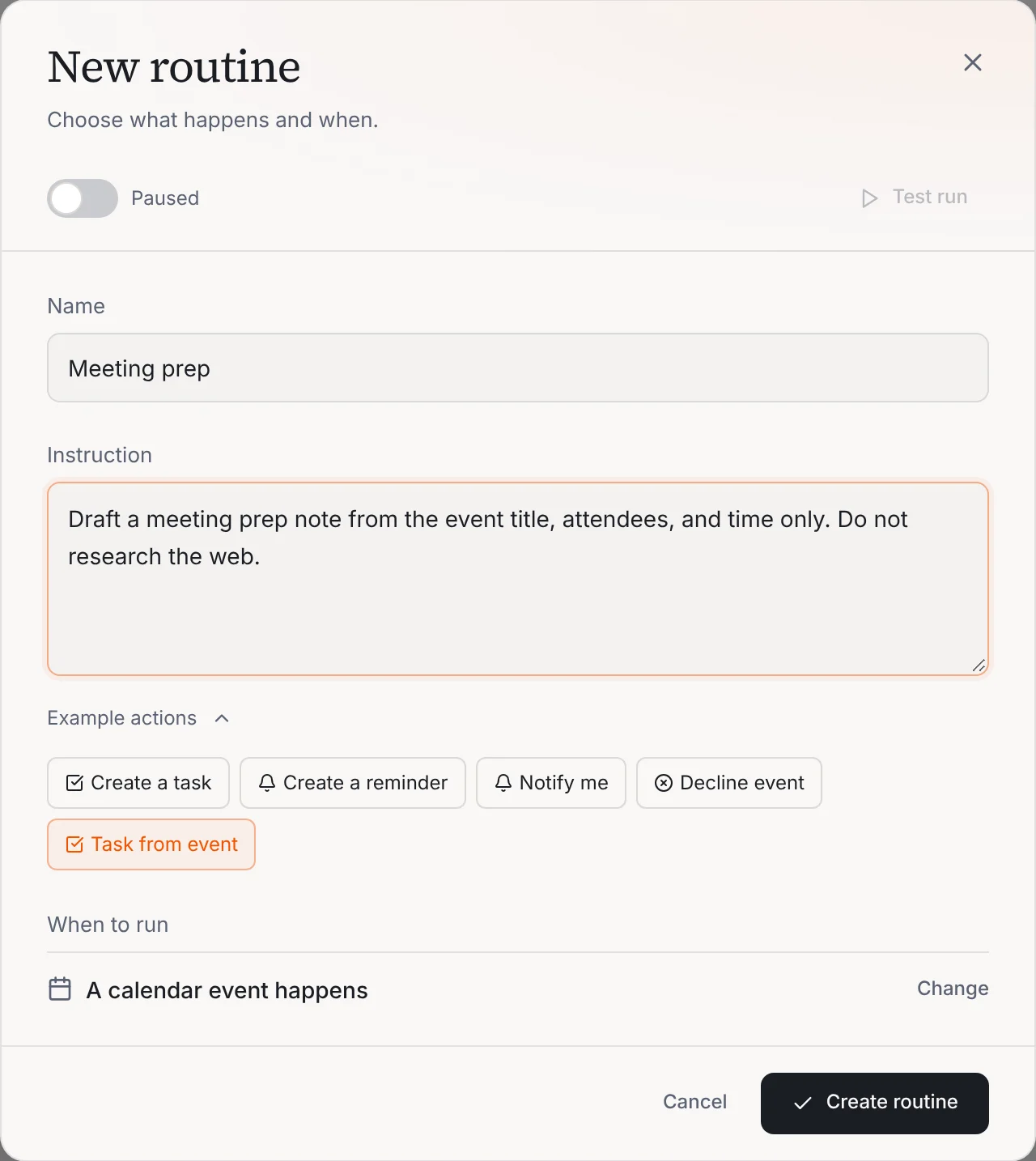
Draft a meeting prep note from the event title, attendees, and time only. Do not research the web.
Draft a meeting prep note: who is attending, when it is, what the meeting is likely about from the title, and three questions worth asking.
Turn this event into a task.
Write the wording once and your AI team drafts a prep note when an event is created. You read it before you join.
How does this work in Operly?
In Operly, this is a routine with a calendar trigger. Operly’s own Auto Meeting Prep template is built this way. It runs when a calendar event happens, applies to events that have attendees, and drafts a prep note from the event title, the attendees and the time. It’s deliberately narrow: it doesn’t go searching the web, and it doesn’t send anything.
New to Operly? Start with how to connect Gmail and Google Calendar, since the routine works from your real calendar. For the morning version of the same idea, see how to automate a daily morning briefing.
What are the limits?
Be honest about what a short prep note can do.
- It only knows what’s on the invite. Operly’s template works from the title, attendees and time. A vague title gives a vague note.
- It’s a draft. You read it, fix it and use it.
- It doesn’t replace your own notes. If you want past conversations in it, say so in the wording, and try it on one meeting first.
How do I keep prep useful?
- Keep it to half a page. If you scroll, trim the sentence.
- Read it five minutes before, not at the last second. That’s what it’s for.
- Fix the wording, not the note. If it keeps missing what you need, add that to the sentence.
Your next step
Copy Wording 1. Set it up as a routine with the calendar trigger. Look at the note before your next meeting. When you’re ready for more, see how routines work, or read why you stopped using AI.

We build Operly, an AI team for business owners. Your chief of staff hands the work to team members who follow up, draft and organize, and you keep the decisions. About Operly · Watch the demo