
You don’t actually want an AI that remembers everything. You want one that remembers the right things, and lets you see them. That’s the difference between an assistant that knows you and one that quietly knows too much.
If you’ve ever re-typed the same background paragraph into a blank chat, you know why people search for “AI that remembers.” This post covers what AI memory really is, why a short list beats “everything,” a starter list to copy, and how it works in Operly.
Does any AI really remember everything?
Not in the way the search suggests. Different tools remember different things, in different ways.
- Saved facts plus chat history. One newsletter describing ChatGPT’s memory upgrade says it now keeps the facts you asked it to remember and also pulls insights from past chats, even ones you didn’t mark. You can view and delete saved memories in its settings, turn memory off, or use a temporary chat that doesn’t use it.
- Topics, corrections and preferences. Atlan’s documentation says its conversational AI remembers topics you’ve discussed, corrections you’ve made and stated preferences. It says there’s no separate settings screen for memory, so you ask it in chat to forget something, and that sensitive details such as passwords and card numbers are discarded.
- A list you control. The approach we’ll cover below: a short list of instructions that you write, read and edit.
The first two try to learn from everything. The third only keeps what you put there.
Why is a short list better than “everything”?
Three reasons.
- You can read it. If you can’t see what an AI remembers, you can’t tell when it’s wrong.
- You can fix it. A wrong memory sitting out of sight keeps causing the same mistake.
- It stays small. Fifty clear lines beat fifty thousand fuzzy ones.
Let’s be real: most of what you tell an AI doesn’t need to be remembered. A few stable things do.
What should I tell my AI once?
Facts and preferences that rarely change and that you’re tired of repeating. Here’s a starter list. Swap the brackets for your own details.
Call me [name]. I work in [timezone].
Keep answers short. Lead with the answer, then the detail.
Put overdue and urgent work first in every summary.
Keep client recaps under five bullets.
[Business name] is a [what you do]. Our main customers are [who].
Write in a [warm, direct, formal] tone. Avoid [words you dislike].
Sign emails as [name, role].
When I say “the usual,” I mean [what it means].
One fact per line. If you’d say it to a new assistant on their first day, it belongs on the list.
What should I never store?
Keep out anything you wouldn’t want sitting in a settings page.
- Passwords and API keys.
- Card numbers and ID numbers.
- Private details about your clients.
Some tools filter sensitive details automatically, and Atlan’s documentation says it does. Don’t rely on that. Leave them out.
Write your list once. Your AI team follows it in every conversation, and you can change it whenever you want.
How does memory work in Operly?
In Operly, memory is a list you can see. In Settings, Memory, the page is called Permanent Memories, and it describes them as instructions the AI will always follow. You add one in the box, or type #remember in chat followed by the instruction.
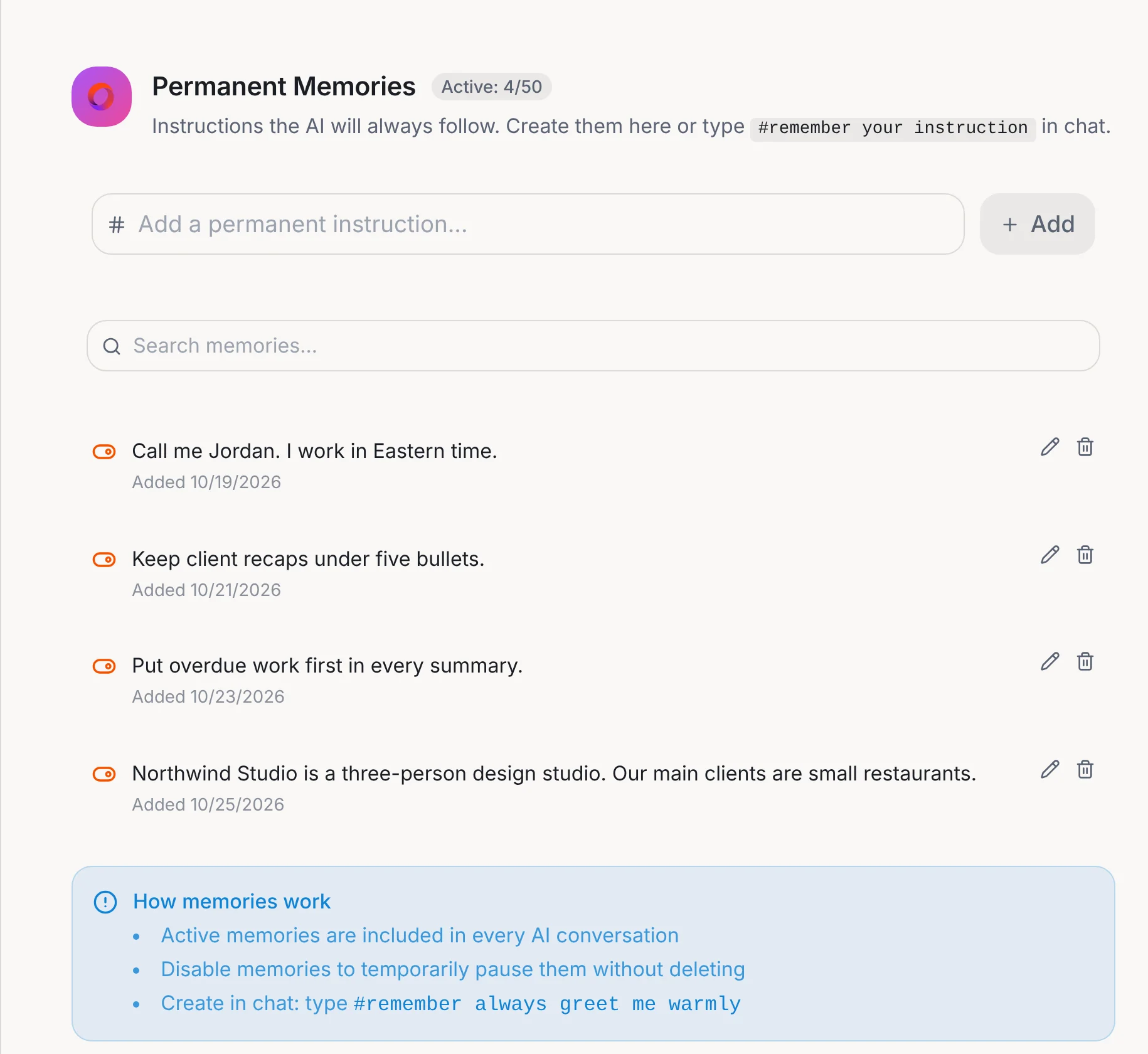
The box on that page says how it works: active memories are included in every AI conversation, and you can disable one to pause it without deleting it. Every memory has an edit and a delete button, and the page has a search box. The counter shows how many are active out of 50.
Memory and files are part of every plan. The same page has Document Memories too. There you upload documents, such as brand guidelines, process docs or playbooks, as permanent context, and the AI draws on the relevant parts of your chats. To work from a single file, attach it to your message with the paperclip. See how to ask AI about your own documents.
New to Operly? Start with how to connect Gmail and Google Calendar.
How do I keep my memory list clean?
- Review it once a month. Delete what’s out of date.
- Replace, don’t stack. If a preference changes, edit the line.
- Pause instead of delete. For something seasonal, switch it off and switch it back on later.
- Keep it short. Active memories ride along in every conversation, so every line has a cost.
Your next step
Copy the starter list. Pick the three that would save you the most typing and add them in Settings, Memory. Then ask your AI team for something and see what it no longer has to ask you. When you’re ready for more, read why you stopped using AI or see Memory and files.
Comparing this with the chat apps? See how Operly compares with ChatGPT and Claude.

We build Operly, an AI team for business owners. Your chief of staff hands the work to team members who follow up, draft and organize, and you keep the decisions. About Operly · Watch the demo