Give a person the calls, errands and in-person work. Give an AI team the first drafts. That split is how most owners get more out of the help they have.
If you’re looking at a virtual assistant for small business work, you’ve probably already decided you need help. The harder question is what to hand off first. Get it wrong and you pay someone to do what you should keep, or you keep what anyone could do. This post sorts it in four questions, then shows which written first-pass work an AI team can cover so a person’s hours go to the work only a person can do.
What should I hand off to a virtual assistant first?
Start with a list, not a job post. The U.S. Chamber of Commerce guide to virtual assistants and Wise’s guide to hiring one (both read November 1, 2026) begin the same way: write down the tasks before you write the job post. Good advice.
So write down what you did last week that wasn’t the one thing only you can do. Then run each task through four questions, in this order.
1. Does it need a voice, a face or a trip? Phone calls, errands, anything in person. Give it to a person.
2. Is it your judgment, your price or your relationship? Keep it. Someone can draft if that helps, but the decision and the words are yours.
3. Is the first pass written and repeatable? Follow-ups, inbox sorting, meeting prep, briefs. Hand the first pass to an AI team and read what comes back.
4. Does it happen less than once a month? Leave it for now. A rare job takes longer to explain than to do.
The order matters. Questions one and two take a task off the table fast. What’s left after question three is your best first hand-off.
What is a human virtual assistant best at?
Some work needs a person, and a good person is worth it. Here’s the short list.
- Phone calls. Calling a client back, confirming an appointment, handling a call that goes sideways.
- Errands and anything off the screen. Booking, ordering, chasing a supplier, and in-person help if you hire someone nearby.
- Relationship work. A person who knows your clients can tell you who gets a call and who gets an email.
- Odd tools. Supplier portals, custom systems, one-off software that nobody wrote a manual for.
- Judgment that builds over time. After a few months, a good assistant stops asking and starts catching things.
None of this is a knock on human assistants. If your list is full of these, hire one.
What can an AI team do so a virtual assistant’s hours go further?
The written first pass. Here’s the thing: a lot of an assistant’s week is typing the same kinds of messages and sorting the same kinds of mail. That work is real, and it’s also the work software handles well.
An AI virtual assistant for small business is software that does the first pass of your written, repeatable work and hands the result back for you to check. We cover the definition in what is an AI virtual assistant. In Operly it’s an AI team: a chief of staff you talk to, plus AI team members you give a job.
These are the first-pass jobs worth handing over:
- Follow-up drafts. The “any update?” email, the thank-you, the reply to a routine question.
- Inbox sorting. Flag the people you can’t miss, archive the noise.
- Meeting prep notes. Who, when and what it’s about, waiting before you join.
- A daily or weekly brief. What’s due, what’s on, what to do first.
- Tasks from requests. An email asks you for something and a task appears.
- Answers from your own files. So you stop re-explaining.
Do these first and a person’s hours, if you hire one, go to the calls, the errands and the relationships. For a longer list with a test for anything else, read what you can delegate to AI first.
What should I keep for myself?
Keep what costs you money or trust if it’s wrong.
- Prices and quotes. One wrong number is now in writing.
- Complaints and bad news. Tone matters more than speed.
- Money, legal and contract questions.
- First contact with someone important.
- Anything that carries your voice. A draft can start it. The words should be yours.
What does this look like in my kind of business?
The sort looks different for each kind of work. Four examples.
- Real estate agent. Person: calls to confirm showings, picking up keys, setting up an open house. AI team: first-pass follow-ups to new inquiries, prep notes before a listing appointment. You: the price conversation and the offer.
- Coach. Person: calls to reschedule, logistics for an in-person workshop. AI team: a draft check-in email from the notes you give it, a weekly review of what’s due. You: the coaching itself and any sensitive client message.
- Local shop owner. Person: supplier calls, deliveries, anything in the store. AI team: drafts of replies to customer and wholesale emails, a morning brief of what’s due. You: pricing, refunds and your regulars.
- Agency. Person: client calls, chasing late assets. AI team: first-draft status updates, tasks from client emails, prep notes before a meeting. You: scope, price and the hard conversation.
Your list will differ. The four questions still sort it.
How do I hand the first pass to an AI team in Operly?
Operly is an AI team that works inside your email, calendar, tasks and files once you connect them. The screens below use a made-up studio, Northwind Studio.
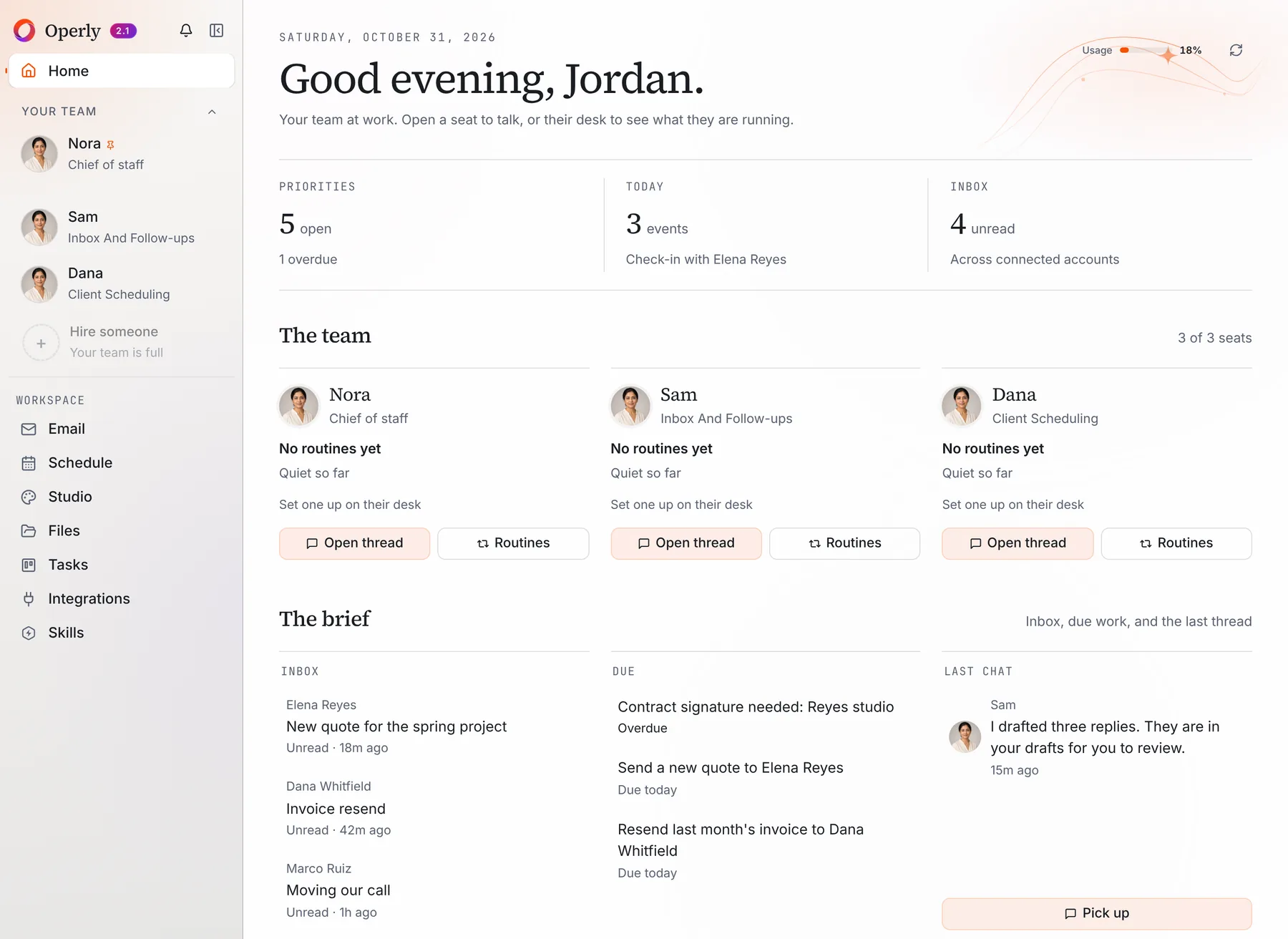
Your team. Home shows your chief of staff and your team members, each with a job. You talk to the chief of staff, and you hire more team members for the jobs you want covered.
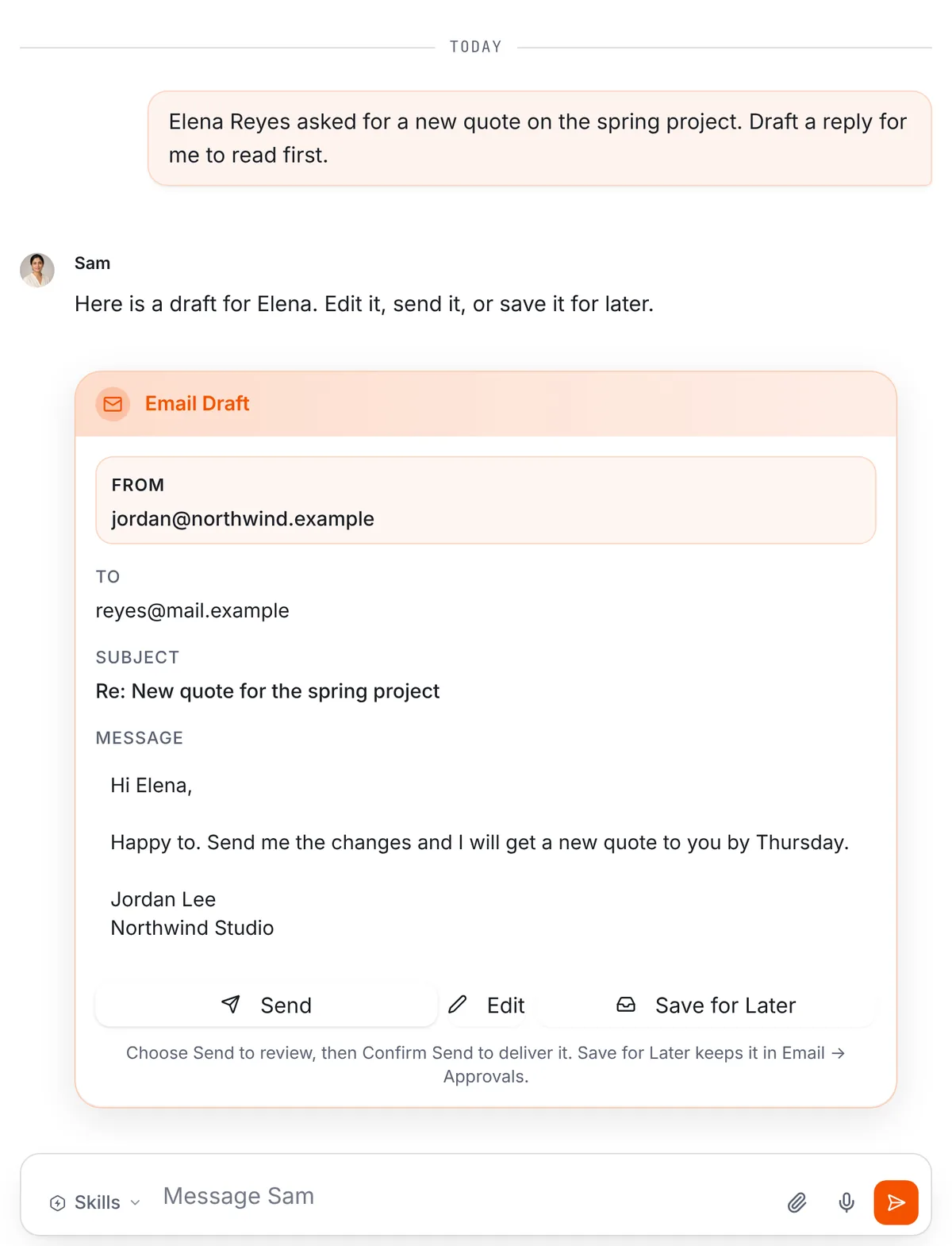
A first draft you read first. Tell a team member what you need, for example “Draft a reply to Elena about the new quote. I want to read it first.” You get an email draft in the thread, with the recipient, the subject and the full text. Use the paperclip in the message box to attach a file.
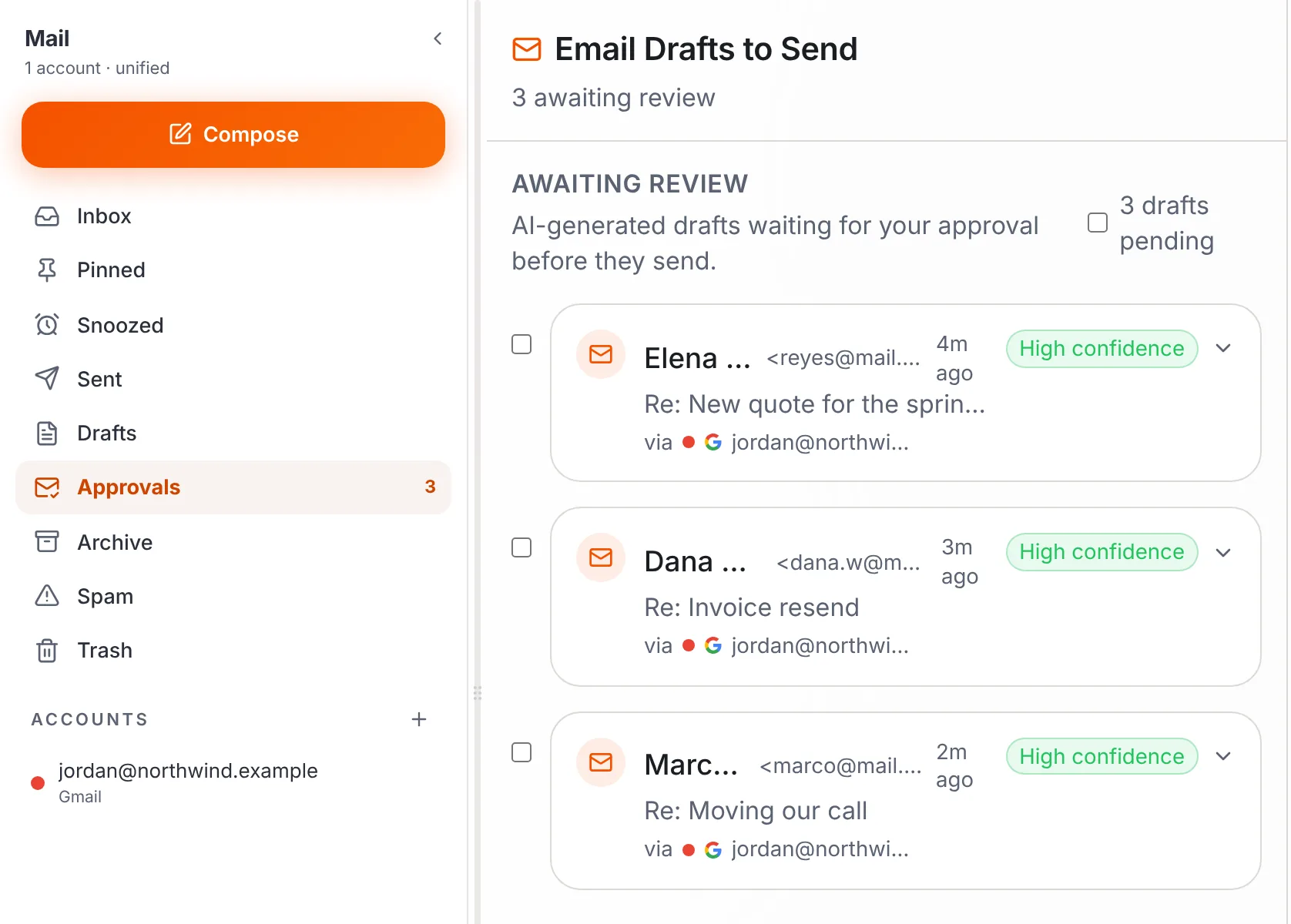
Drafts you save wait in Email, then Approvals.
Who sends? Your team carries out the sends you ask for, so ask for drafts when you want to read first. With your chief of staff, say “draft it” when you want to read first.
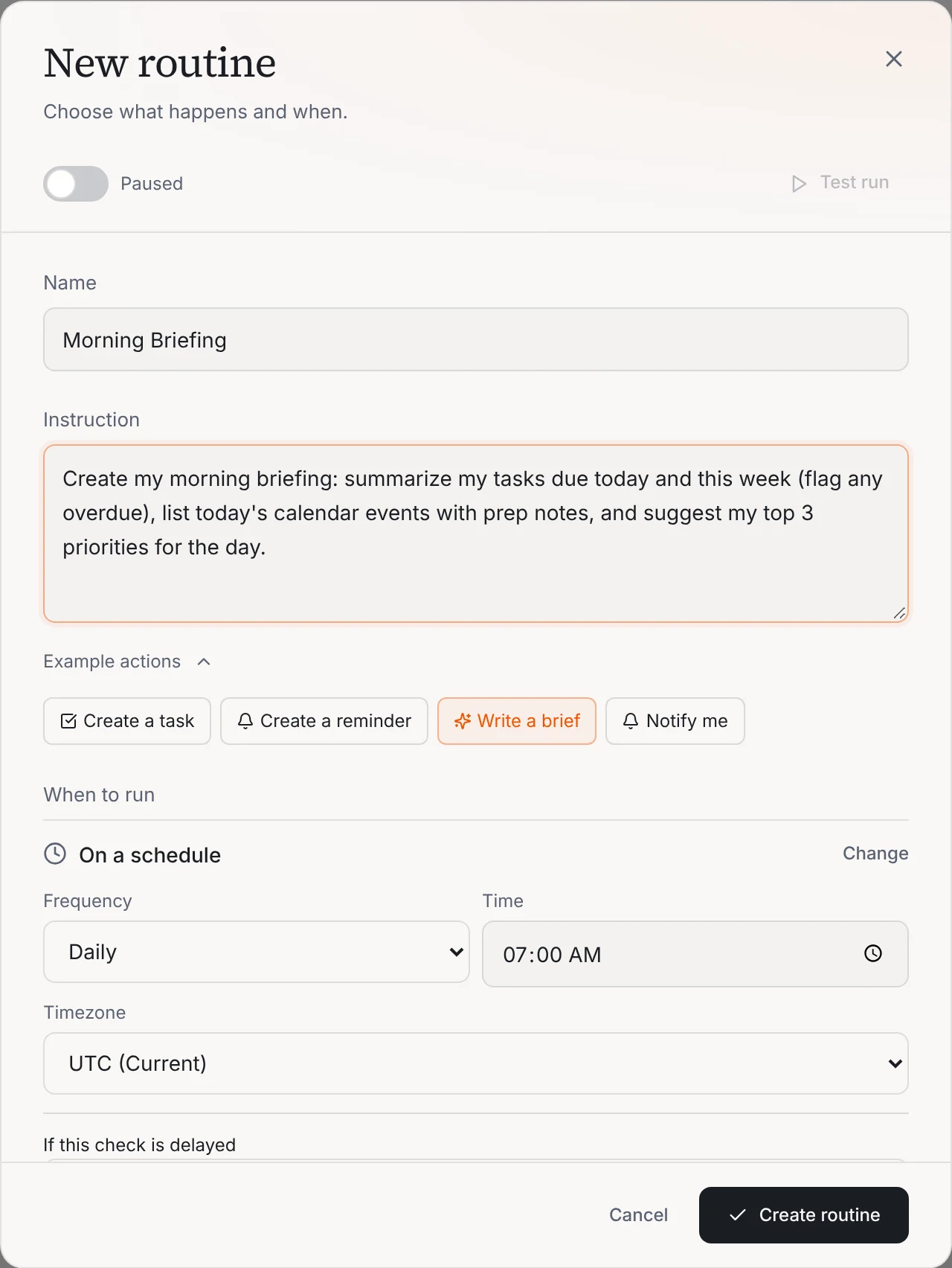
Jobs that repeat. A routine is a job written as a sentence with a trigger. The trigger can be a schedule, such as every morning, or a new email arriving. Open a team member’s desk and select Routines to set one up. This one writes a morning brief every day at 7:00 AM.
Plans. Pro is $50 a month, or $500 a year with two months free, and includes 3 seats. Business is $200 a month, or $2,000 a year with two months free, and includes up to 20 seats. Business adds premium voice calls with your team, five times the premium usage and up to 20 seats. A seat is a place for a team member on your team. Pricing has the details, and the routines page covers the repeating jobs.
Before you connect your email, read the Privacy page rather than a summary here.
Meet your chief of staff, give it one job from question three, and read what comes back before it goes anywhere.
What won’t an AI team do for you?
Be clear about the limits before you decide.
- Phone calls and errands. Operly works in your email, calendar, tasks and files. It doesn’t phone your clients or run errands. Premium voice calls on the Business plan are you talking with your team.
- Judgment. It doesn’t decide on price, complaints or anything that needs your relationship.
- What it can’t see. It works from what you connect and what you tell it. If something lives only in your head, say it.
- Magic. You still read what it writes.
Should I hire a person, use an AI team, or both?
Count your answers from the sheet.
- Mostly question one. Your list is calls, errands and in-person work. Hire a person. If you decide to hire a virtual assistant for small business tasks, the U.S. Chamber guide suggests starting on a trial basis, and that’s a good habit with anyone new.
- Mostly question three. Your list is written first drafts, sorting and follow-up. An AI assistant for small business owners can cover that. Start with one job.
- A mix. Use both. Let the AI team write the first pass, and give your person the calls, the errands and the relationships.
Rates for a human assistant vary a lot by region, hours and skills, so get a few quotes. If you want the head-to-head version, read virtual assistant vs AI, which has a 15-minute task sort, or the side-by-side comparison.
What should I do this week?
Five short steps.
- Monday. List last week’s tasks. Don’t edit yet.
- Tuesday. Run each through the four questions.
- Wednesday. Pick one question-three task. Ask your AI team for a draft, not a send.
- Thursday. If you’re hiring, write the first brief for a person, using the template below.
- Friday. Ask three questions. What got done without me? What needed my judgment? What do I hand off next?
The job: one sentence. “Call these five clients to confirm Thursday’s appointments.”
What good looks like: what you’d see when it’s done right.
What they can decide: the calls that are theirs to make.
What to ask you first: price, refunds, anything unusual.
When you want to hear back: a day and a time.
One job, written clearly, beats ten described vaguely. Do the same with your AI team: one sentence, then read what comes back. When you’re ready for the next job, see how routines work.

We build Operly, an AI team for business owners. Your chief of staff hands the work to team members who follow up, draft and organize, and you keep the decisions. About Operly · Watch the demo