
The best AI for insurance agents drafts the routine replies and leaves the advice to you. That’s the version worth trying, and it’s the one this post covers.
It’s renewal season, three clients are waiting on a reply, and a quote request is sitting under a carrier notice. Let’s be real: nobody got licensed to retype the same “thanks, let me look into that” email again and again. Much of what you’ll read about AI for insurance agents is about quoting robots, claims intake and phone bots. Useful for some agencies, but that’s not the pile on your desk tonight. Your pile is the inbox.
So here’s what AI can do for you today: read the email that came in, write a draft reply in your voice, and hand it to you to read, change and send. Below you’ll find five emails to copy, a plain list of what AI should never do, and what it looks like in the real app.
What can AI actually do for an insurance agent today?
It helps most with the work that surrounds the conversation, not the conversation itself.
- Drafting replies to the client emails you get every week: renewal questions, add-a-driver requests, proof-of-insurance requests, “any update on my quote?”
- Writing the first version of check-ins you’d otherwise type from scratch.
What it doesn’t do here: it doesn’t give coverage advice, decide anything that needs your license, or replace the call where a client decides what to buy. Think of it as a very organized assistant who writes the first draft and hands it to you.
Which five emails should I send during renewal season?
Swap the brackets for real details. Keep them short, give one next step, and never promise coverage or a price in writing unless you’re sure. These are examples to adapt, not carrier-approved wording, so check what your carriers and your state require.
Subject: Your [policy type] renewal is coming up
Hi [Name],
Your [policy type] policy renews on [date]. I’d like to go over it with you before then so there are no surprises.
Do you have 15 minutes [day] or [day] for a quick call? If anything has changed for you, like a new driver, a move, a renovation or a new business, bring it along.
[Your name]
Subject: Re: Your renewal premium
Hi [Name],
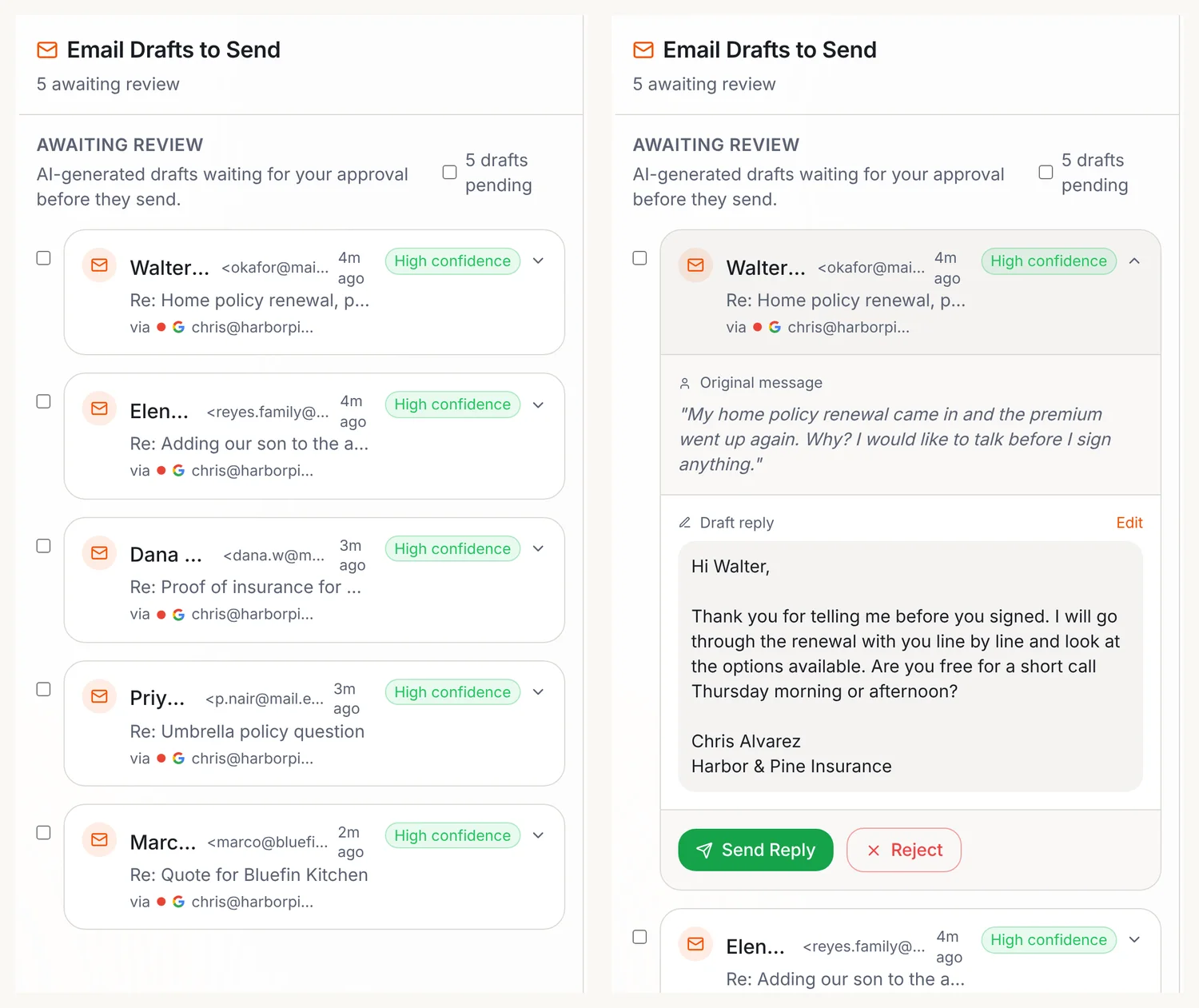
Thank you for telling me before you signed anything. I’ll go through the renewal with you line by line and look at the options available to you.
Are you free for a short call [day] morning or afternoon?
[Your name]
Subject: Re: Adding [name] to your policy
Hi [Name],
Happy to help with that. Please send me [what you need, for example full name, date of birth and license number], and I’ll walk you through what changes before anything is updated.
[Your name]
Subject: Re: Your quote for [business or property]
Hi [Name],
Thanks for checking in. I’m waiting on [what you’re waiting on] and will send you the comparison as soon as I have it. I’ll update you by [day] either way.
[Your name]
Subject: A quick check-in on your coverage
Hi [Name],
It’s been a while since we looked at your coverage together. A lot can change in a year, and I’d rather hear about it from you than find out at claim time.
Do you have 15 minutes [day] for a quick check-in? There’s no pressure, and no changes unless you want them.
[Your name]
A few habits that make any of them better:
- Use their name and the one thing they asked. “Thanks for telling me before you signed” beats any clever subject line.
- Offer a call for anything about price or coverage. Writing it out in an email is how misunderstandings start.
- Never guess. If you don’t know the answer, say when you’ll have it.
- Keep records. Your agency’s rules for client communications still apply to every message.
Ask your AI team to draft replies to this week's client emails, and ask for drafts when you want to read first.
What does this look like with an AI team?
Here’s how it works in Operly. You ask, your team writes the drafts, and you keep the decisions.
- Ask for what you need. Something like: “Reply to this week’s renewal and service emails. Mr. Okafor is upset about his premium, and the Reyes family wants to add their son to the auto policy.” Add anything you know that the email doesn’t say.
- Your inbox team member writes a reply to each one. You can add one with Hire someone in the sidebar, or describe the job to your chief of staff, who recommends team members and offers to hire them for you.
- You read, edit and decide. Each reply is a draft. Open it, change anything you like, and click Send Reply. Don’t like one? Reject it.
New to Operly? Start with how to connect Gmail and Google Calendar. Your team carries out the sends you ask for, so ask for drafts when you want to read first.
What should AI never do in an insurance agency?
Draw the line early, and everything else gets easier.
- Coverage advice. What a client should buy, drop or increase is a licensed conversation. It’s yours.
- Binding, quoting or changing a policy. Operly doesn’t quote across carriers or plug into carrier portals, and it isn’t connected to agency management systems. Those steps stay in the tools you already use.
- Claims decisions. Operly doesn’t take claims or decide them. When a client writes in about a loss, that’s a human conversation first.
- Promises in writing. “I’ll get that to you Friday” is fine if you mean it. Read every draft for anything that sounds like a commitment.
You stay responsible for what goes out under your name, and for following your agency’s, your carriers’ and your state’s rules on client communications. This is general information, not legal or compliance advice.
Is it safe to give AI access to client email?
It’s the right question to ask before you connect anything. Operly connects to your Gmail and Google Calendar through Google sign-in, so your team works from your real mail instead of copy and paste. Before you connect client email, read the Privacy Policy, check what your agency and carriers allow, and start with a small, low-risk request so you can see exactly what it does.
How do I start in 15 minutes?
- Connect Gmail.
- Ask your team for replies to this week’s renewal and service emails.
- Read each draft out loud. If you wouldn’t say it to the client, change it.
- Send the ones you like. Reject the ones you don’t.
That’s it. One request, a pile of drafts, and you decide what leaves your inbox. When you’re ready for more, see how Operly works as AI for insurance agents or watch the demo.

We build Operly, an AI team for business owners. Your chief of staff hands the work to team members who follow up, draft and organize, and you keep the decisions. About Operly · Watch the demo